

insanely specific creative tools
create tools that augment your creativity


In the past couple of years, I moved across the country to a city with seasons, had a baby, and quit my job. Along the way, I found myself in a real style rut. My beloved collection of button downs was not cutting it for me any more. I wanted to redevelop my eye.
I’ve written about my process for doing this: collect a comically large pile of inspiration, figure out which attributes I’m most drawn to, then collide my judgment against reality. What I needed was a mood board. But none of the mood boarding tools I found were quite right. I don’t want ads, and I don’t want fake AI-generated images mixed in with real ones. I want something more like a canvas, where I can duplicate things and drag them around to make little outfits, where inspiration photos and actual shoppable things can co-exist. I want the images to remember where they came from -- the URL, the brand, the price. I want to import stuff from my phone (screenshots!!) but do the creative work from my computer. I want layflat images of clothing even when the retailer won’t give them to me. And I want full control of my data, so I don’t lose it if I stop paying for the app.
No existing tool scratched the itch. So I made one! And you can buy the code to run it locally (or adapt it to your needs) here! (I promise it is super easy to do, even if you’re not the slightest bit technical).
I want to tell you all about this tool, how I made it, and how I adapted the concept for a very different creative task (researching for a podcast). But first let me explain my mental model.
interns vs. blacksmiths
Like all metaphors for technology, the idea of AI as a coworker or an intern is both helpful and limiting. It’s helpful because it’s a good heuristic for how to prompt, and for why AI behaves differently from deterministic software. But if it becomes your default, you cap the technology at what a more junior version of you might do. You find yourself delegating tasks a person could theoretically take off your plate, instead of imagining a different way of working.
This is especially limiting when it comes to creativity. I know many creative people who bemoan going into management. They all say the same thing: “I used to love my job, but now I never get to do the work that drew me into [field] in the first place because I’m too busy dealing with people.” Why would someone who feels this way get excited about a technology that automates the part of work that they enjoy? They wouldn’t, and I have found they aren’t. But there’s another way!
Use AI to augment, not automate, your creativity.
When I think of AI augmenting my creativity, I imagine something more like the Greek god Hephaestus, watching me toil away on earth and then handing me a custom-made tool for my problem. Then he keeps watching as I use it, seeing where the tool fails or where I fail to use it, and tweaking it until it fits my hand exactly. This is a very different model: unlike an intern, who takes work off your plate, a blacksmith expands what your hands can do.
Any creative tool you are using has been forged for millions of hands working on billions of different projects. It was expensive to build and complex to maintain, so someone would only put the effort into making it if there was a big enough market to serve. Now, it’s cheap for anyone to make a tool for themselves that fits their extremely specific needs. Any time I start on a new project, I end up making a tool that’s custom-built to support the exact thing I need to do.
As a result, my Mac dock looks like this:

Each of those icons is a custom tool.
Grace Kellyvision
I call my mood boarding tool Grace Kellyvision, after a photo of Grace Kelly that ranks among my top style (and life) inspirations:
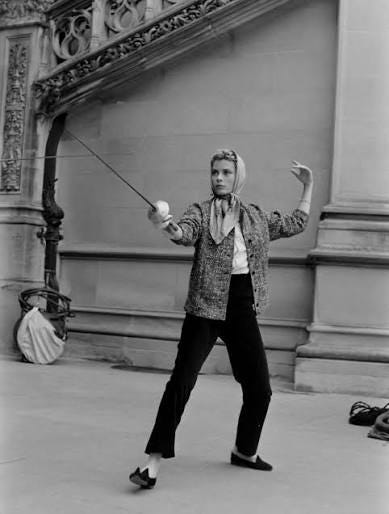
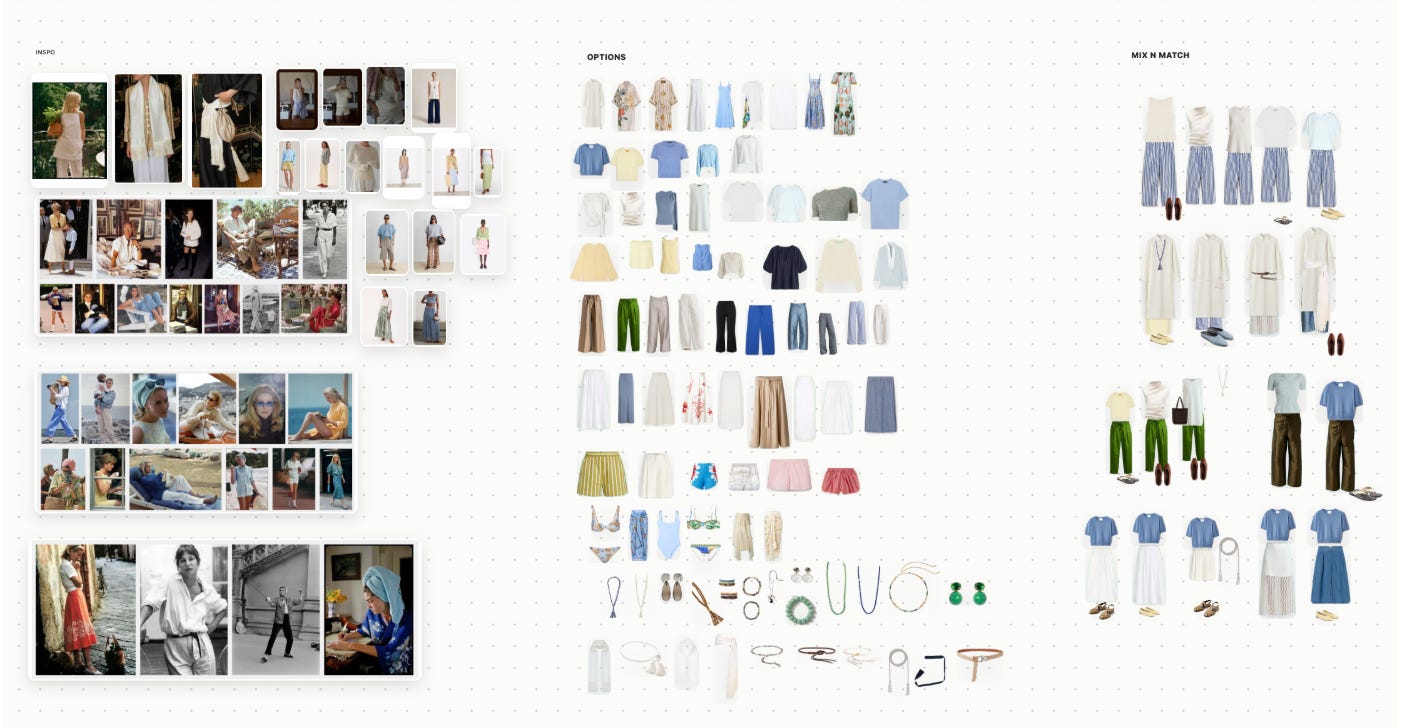
Grace Kellyvision is basically a giant FigJam board -- an infinite canvas -- with a few hyper-specific details that make it ideal for people who like to browse lots of clothing online but then only buy a couple of things they feel highly confident in.
Here’s a zoomed-out view of my board. On the left, you can see some inspiration photos, collected from Pinterest and various ecommerce sites. In the middle, I’ve pasted in a bunch of apparel and accessories I found online and was drawn to, though not necessarily items I would buy (I’m ignoring price at this point). Then, on the right, I’ve mixed and matched the items into different potential outfits. Once I buy items, I can add photos of myself trying them on, then mark what I want to return (I built a separate tool for handling returns, which I’ll write about in a future newsletter).
So why not just use FigJam? FigJam is a great multi-purpose tool, but again, I want my tools to be HYPER-SPECIFIC to my task at hand, because they only need to serve a market of me.
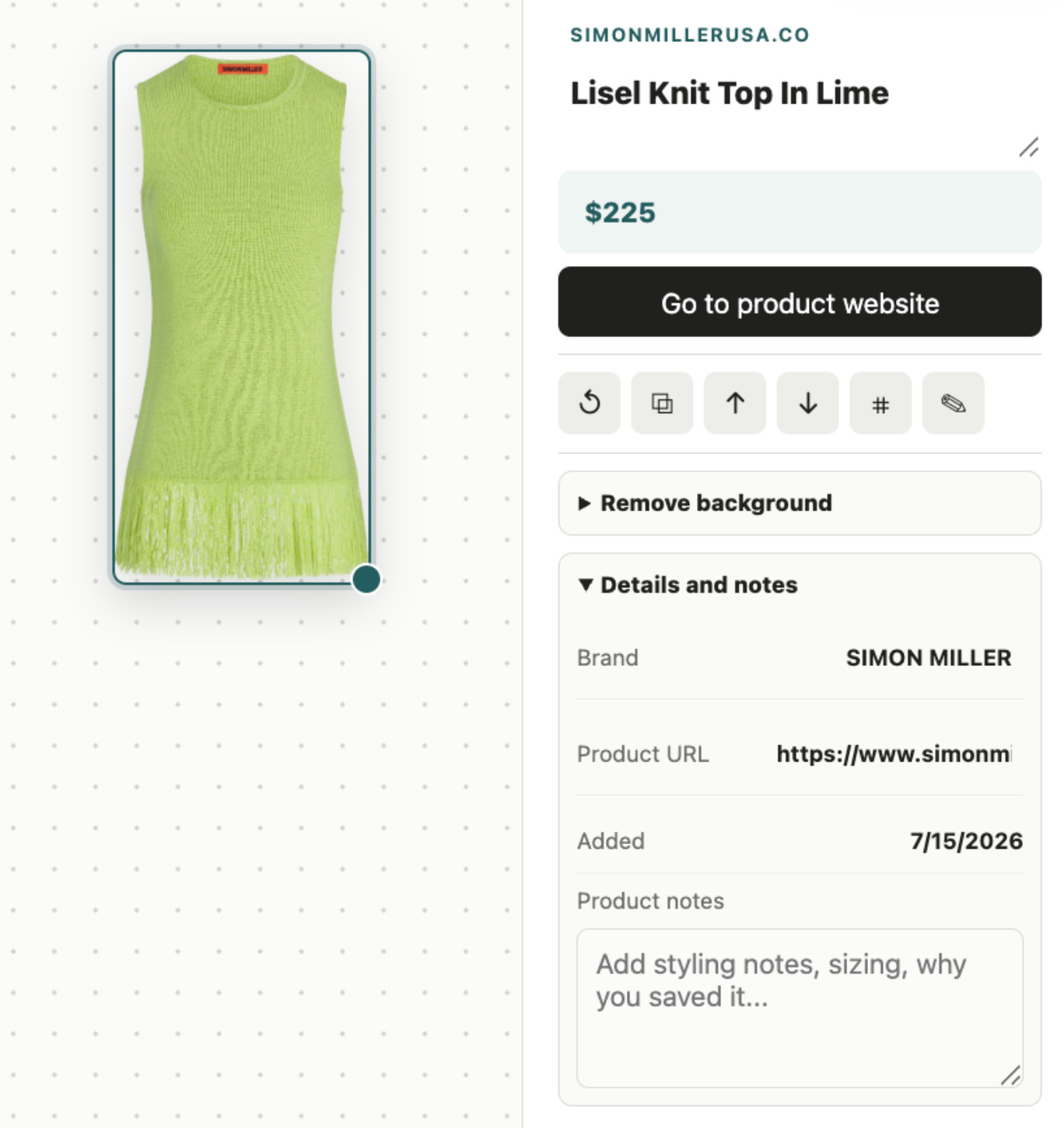
For example, when I paste in a shoppable item, it saves the metadata I care about -- source URL, brand, cost:
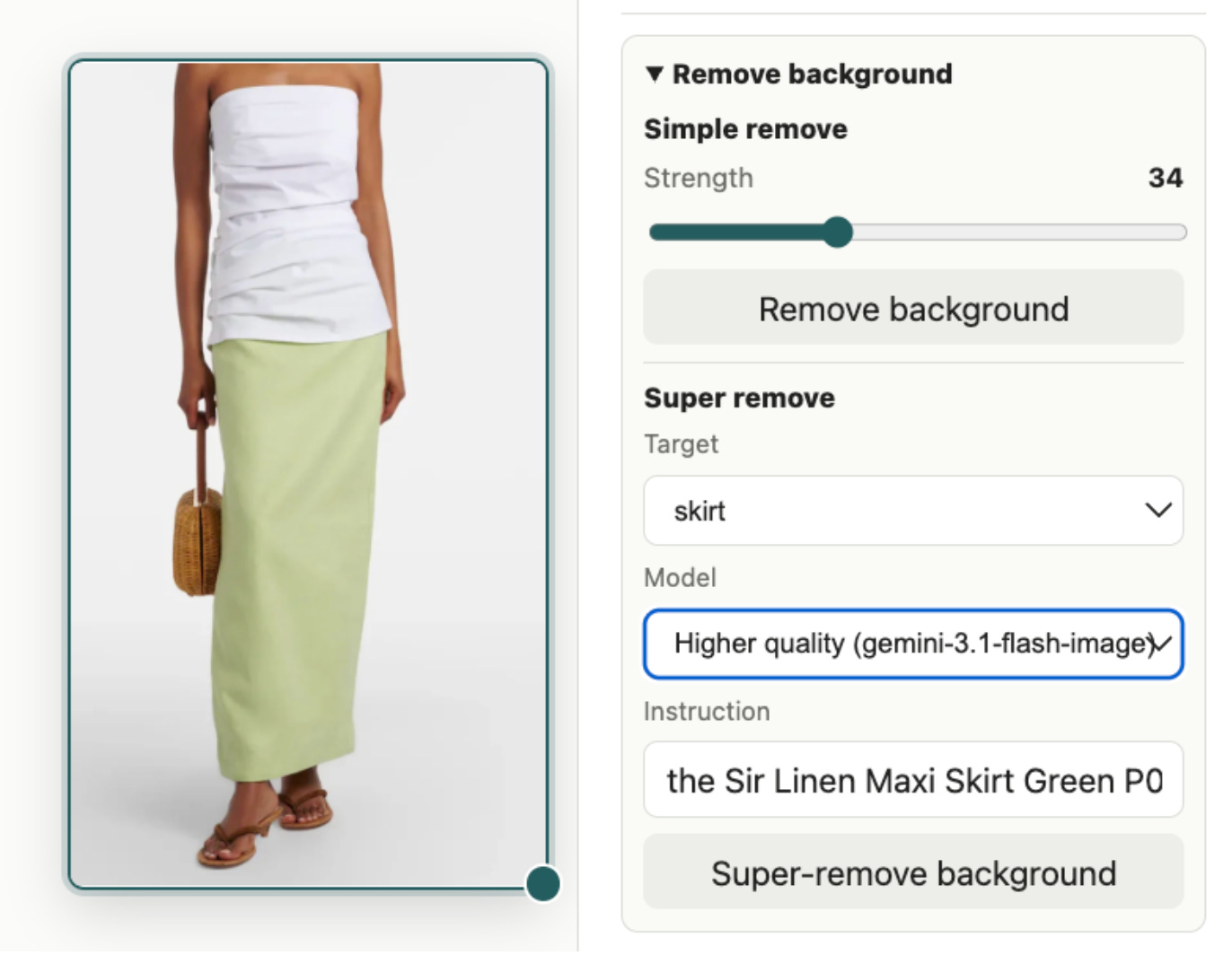
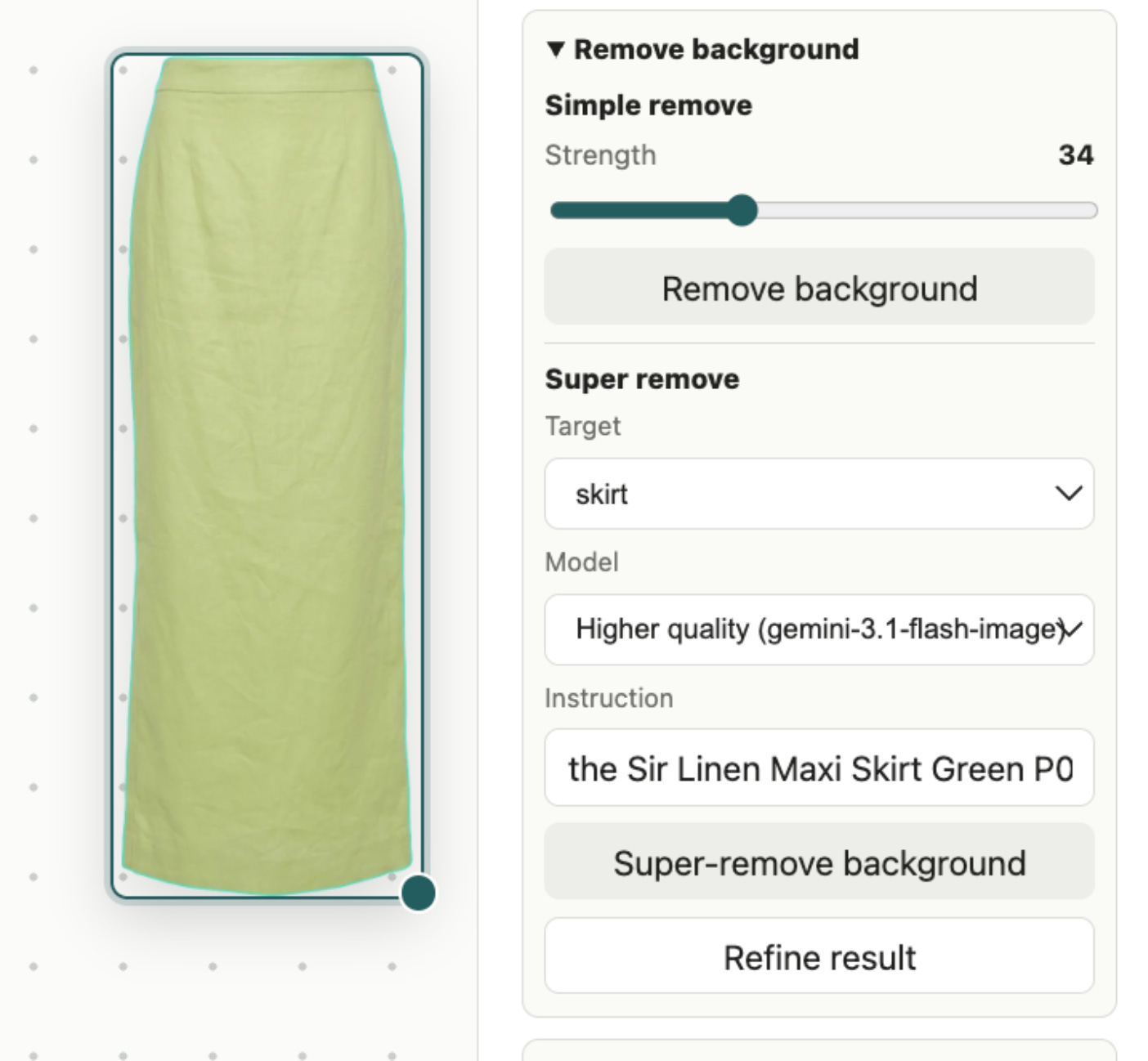
When a site blocks image imports, I paste a screenshot instead. And when I need to go from “dress on a model” to “lay-flat with no background,” I have what I call super-remove, which re-renders the item using a better image model:
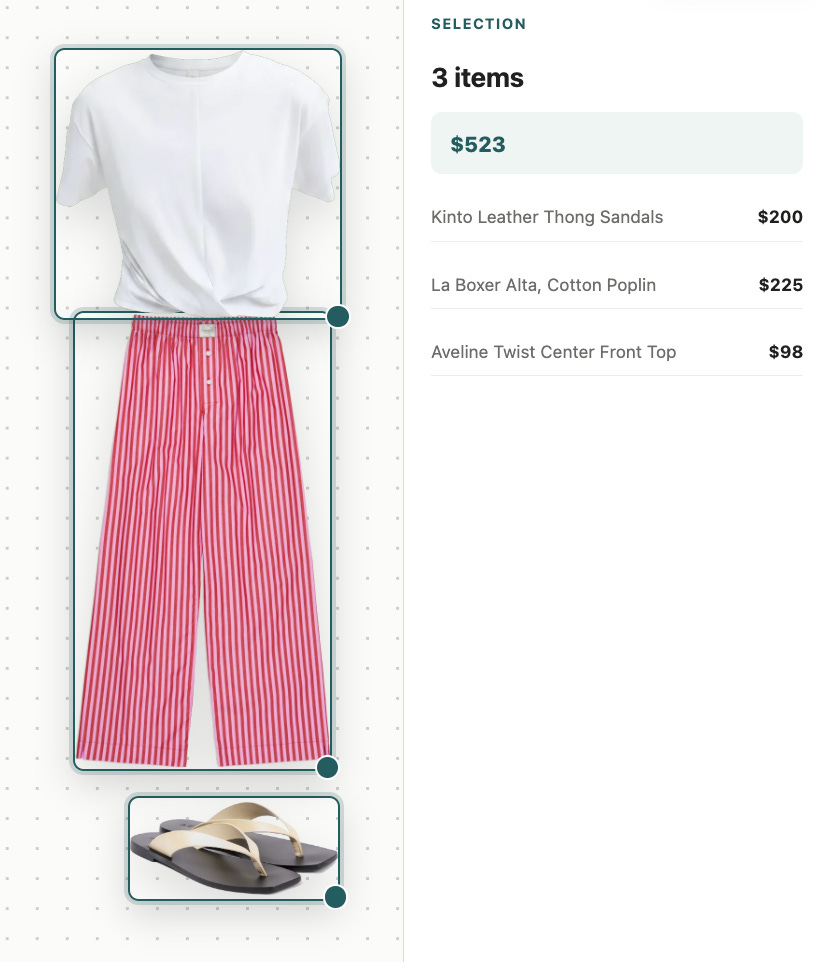
You can highlight a set of items to see how much the whole outfit costs:
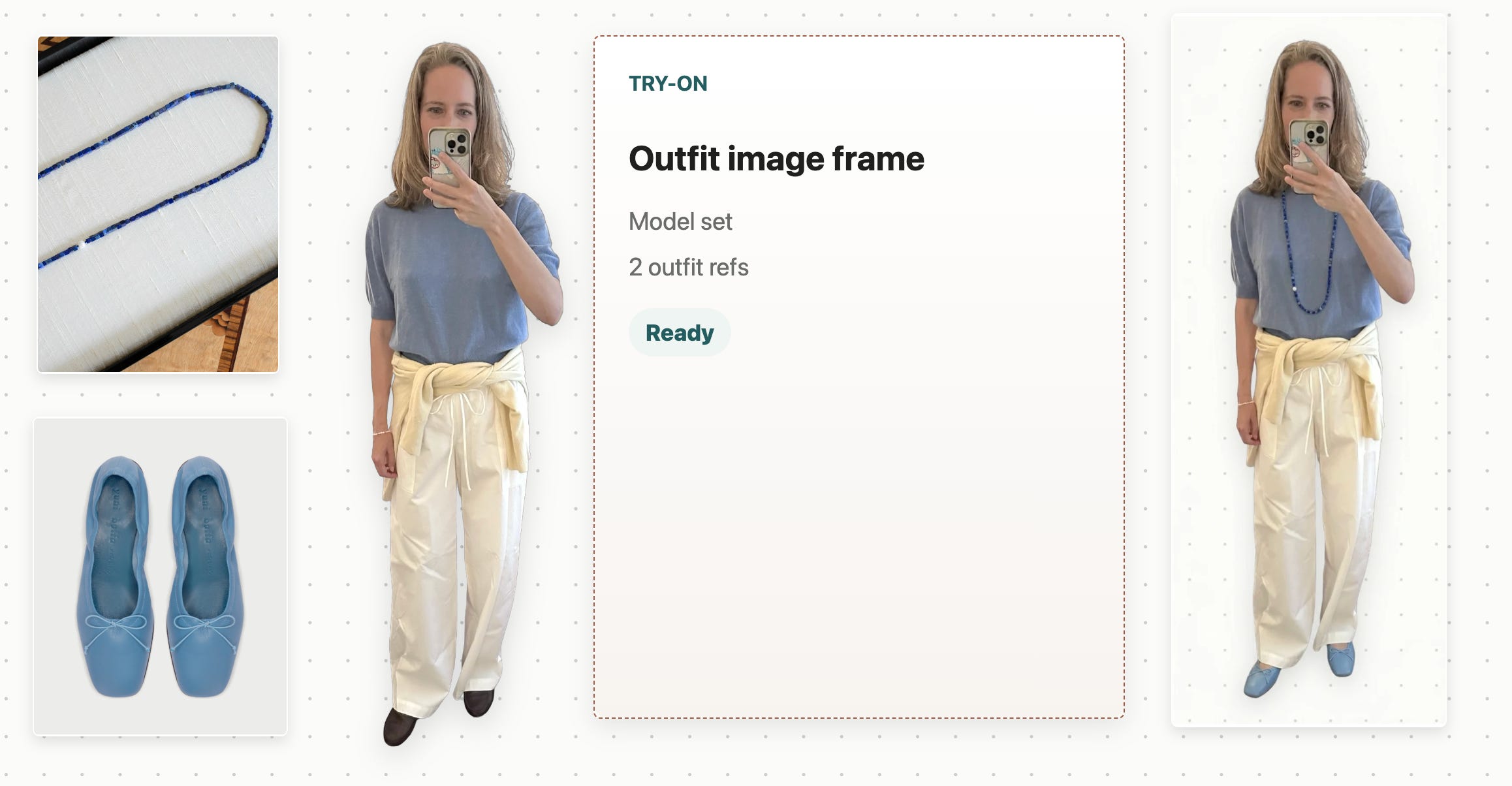
There’s also a little dressing room that lets you take an image of yourself and “try on” items you’ve collected on your board:
There are small but useful details like this all over the app. It’s so fun! Using Grace Kellyvision feels like playing with paper dolls on a big open floor surrounded by magazines.
While I do believe in consulting people with expertise as a way to calibrate and improve your own judgment, you’ll notice I don’t lean on the AI to recommend things to me, or provide any input. That would defeat the purpose! It is, very deliberately, a tool for helping my own point of view become clear to me. And when I want to discuss my evolving thoughts with others, coming to those conversations with a developed mood board helps us dig right in.
If you want to play around with Grace Kellyvision, you can buy the code and simple setup instructions here.
Card Board
Because I liked Grace Kellyvision so much, I started thinking about how I could use the same general concept for other types of creative work.
For the past month, I’ve been deep in research for a top secret podcast concept (!). It involves finding, reading, and annotating a variety of primary sources (largely PDFs and old video recordings on YouTube).
As with Grace Kellyvision, I don’t want the tool to do the thinking for me. After all, for me to tell an interesting story based on the research I’ve done, I need to really internalize the facts. If AI does all the research and hands me a summary, I will not have been changed by the experience, and to do a good job I need to be changed by my research.
And yet AI helps me quite a bit -- one level below the thinking. It points me toward primary sources worth my time and helps me prioritize where to spend the most time.
And, of course, it forged me another tool fitted to exactly one job: collect sources and notes, then shape them into a story. What I was picturing was a giant table covered in index cards, but searchable, and multimedia. So: Card Board!
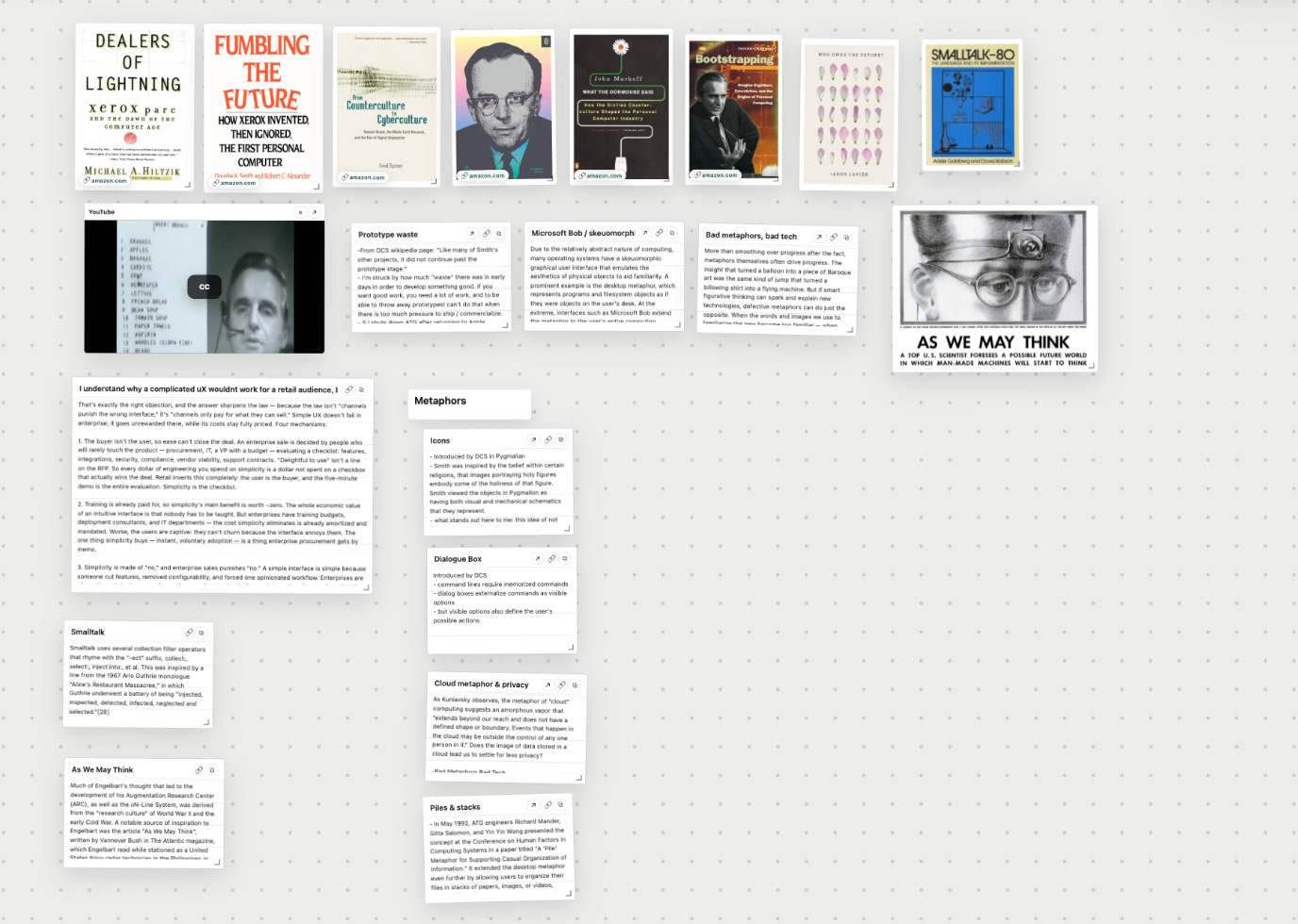
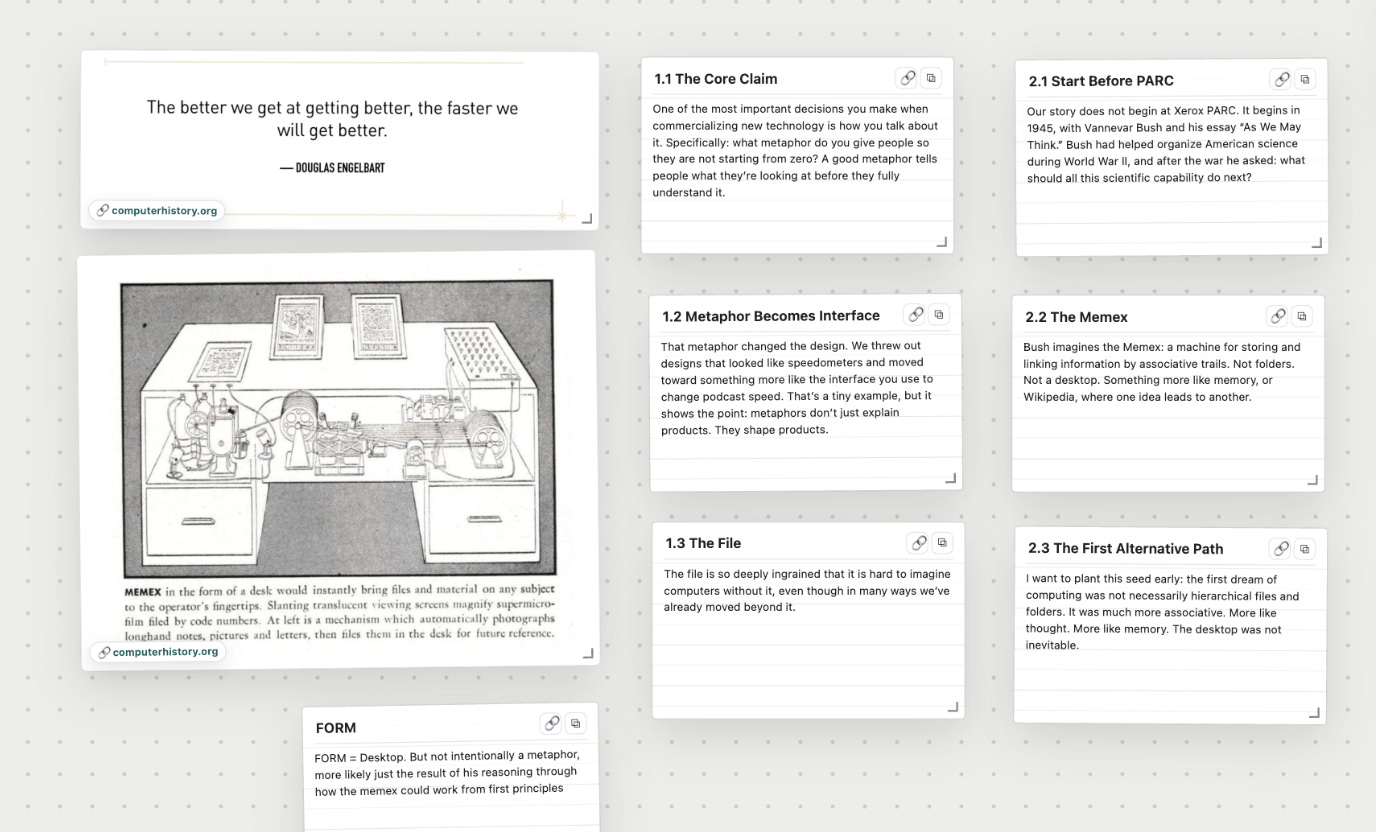
The canvas holds the material so my head can more easily work across everything to shape the story. I do ask AI for feedback on my work -- I’ll record myself talking through a draft and ask about the pacing, for example -- but this tool is relatively low-tech. I just needed the AI to build it, custom-made for the job.
how I build my extremely specific tools
Every one of these tools starts as a conversation in Claude Code. Chatting is, for me, the ideal way to get a project started and figure out the shape of it. But once I find myself coming back to the same conversation day after day, I know I need a better interface than the chat window -- something less flexible and more opinionated.
Making that leap is technically very easy but practically tricky. I can get a workable version off the ground in less than an hour, but I then spend weeks continuing to refine it as I use it.
Here’s how I do it.
1. Describe the problem, not the solution. I fire up Claude Code, tap Wispr Flow (a dictation app -- I talk instead of type), and say something like:
The problem I am trying to solve is that I am in a style rut and need to get inspired. I think mood boarding can help, but none of the mood boarding apps I’ve tried have done the job for me. I have a general idea for what I want the solution to look like. It’s basically a giant FigJam board, but I can easily import images of clothes from URLs or screenshots, and it saves the brand, price, and URL as easily referenceable metadata. Oh, and I want to be able to remove backgrounds from images. If you have any ideas for how to make the experience 10/10, go ahead and implement them, but I want this to start as a local app that only I am going to use, so don’t go overboard just yet.
Voilà! It makes the app. Simple, right?
2. Expect 50%. This first pass usually gets me about halfway there. (You may have seen people online test new models by recreating a whole game they love in a single prompt, which creates the impression that making an app should be instant. If you’re rebuilding something that already exists, it more or less is -- every detail has already been decided by someone else.) But nobody has decided the details of your tool yet. Going through the details myself is how I go from “fitted to the average hand” to “fitted to my specific hand”; half the time I don’t know what I want until the default user experience shows me what I don’t.
3. Refine out loud -> tickets. I use the app and talk out loud as I do. I go through every flow -- importing an image, zooming in and out, scrolling, removing backgrounds, moving layers, etc -- and provide my feedback out loud, as though I were watching someone use the app and telling them what to fix over their shoulder.
I drop all this feedback into one chat thread, which has been given this set of instructions:
Refine every issue I raise into a ticket in Linear. For anything non-trivial, describe to me three possible implementation approaches, the tradeoffs between them, and your recommendation.
Sometimes I have strong opinions and micromanage the implementation within an inch of its life (as I did for super-remove, the AI-powered background/model/styling remover), and sometimes I say “sure, whatever, that seems fine, let’s keep it moving.”
You can, of course, be more or less hands-on with implementation details. The models are sufficiently good and can get the job done. But for me it’s not a question of technical capability; I am trying to improve my own instinct for tradeoffs between different technical implementations, so I want to get rapid reps thinking through those calls without unnecessarily slowing my project down.
4. Let the orchestrator ship. While I’m chatting in that thread, a second thread acts as an orchestrator. I give it these instructions:
Watch the tickets as they come in. Decide priority and sequencing, assign the work to sub-agents, and review the quality of what comes back. Keep things moving and only flag major questions or issues to me, otherwise figure out the best solution and ship.
I split this out into two threads because the rate at which I can scope work is much faster than the rate at which the AI can complete and evaluate the work. I can go at my own pace, I don’t have to wait long stretches where the AI does work and I’m either sitting there or context switching to another project (I try to avoid doing this whenever possible so I don’t get spaghetti brain), and because I have done the upfront work to refine the tickets (ie work through implementation questions, defining what “done” means, clarifying what I care about vs. where the AI can take liberties, evals, etc), I can trust that the downstream work will be good.
5. Live with it for two weeks. Before I worry about scaling anything, I use the simplest version of the app I can, usually locally on my computer. Many of my ideas never make it past this stage! I think I have a great idea, but after a week of use it has completely fallen by the wayside. When that happens, I rescope the problem and try again. (My first attempt at what became Grace Kellyvision was a Tinder-swipe-style feed of inspiration images that seemed way cooler in my head.)
6. Scale only what survives. If I’m still finding it helpful after two weeks of use/refinement, then I think about scaling -- do I want it on other devices? Do I want other people to use it, with their own accounts? How big will the biggest board get? Again, I approach this in two separate chat threads, one where I’m discussing the work and writing tickets, and another where the work is being orchestrated.
want to try grace kellyvision?
I’ve shown Grace Kellyvision to a few friends, who have all asked me how they can make something similar.
You can buy my code, along with setup instructions at: writerbuilder.com/grace-kellyvision.
If you are intimidated by the idea of setting up code, don’t be! The instructions are basically only one step, and they are: paste this link into ChatGPT Work or Claude Code and set up Grace Kellyvision for me.
You can then tweak the product however you want. Maybe you are looking for interior design inspiration, or you are getting a new tattoo, or feel like it’s time to go down a vintage jewelry rabbit hole. Just ask your friendly coding agent what it recommends changing about the app to suit your use case.
Hephaestus may have forged tools for the gods while the rest of us got mass-produced tools that fit everyone and no one. Not any more! How are you augmenting your creativity with hyper-specific tools?
And because I opened this essay talking about my style rut, let me close with an update: I have been absolutely getting some fits off this summer.

xoxo,
hils
More Writerbuilder
how to figure out what you want

I graduated from college with a literature degree and an understanding of the job landscape that was largely based on the career tracks you read about in Richard Scarry books.
monkey grapes

There is a YouTube video I think about almost every day. Two Capuchin monkeys complete tasks in their cages. When they finish, they receive a cucumber. Life is good.
But then! Paradise lost. The second monkey starts getting a grape for the same task. The first monkey continues to get cucumbers. When he sees the second monkey receiving a grape, he flies into a rage, throwing the cucumber back at the handler and shaking the bars of his cage.
This is what it feels like to live in San Francisco. Or simply to be on social media. People are perfectly happy with their lives, right up until the moment they see someone else getting a grape while they are the chump stuck with a cucumber.
sea legs

When I left my job, people congratulated me on betting on myself. From the outside, perhaps, it looked like I was taking a risk.
It did not feel like that from the inside.
I love how you’ve captured and explained your process for building and iterating! You think you might release your code for Card Board next? ;)
As always, I'm amazed by your creativity and ability to explain complex topics in a digestible way. This is such a cool idea!